


AI agent security was already becoming a serious problem. Apple just made it a Mac problem too.
For years, the basic privacy bargain on a Mac has been easy enough to understand. An application wants access to something sensitive, macOS puts up a permission prompt, and you decide whether to let it through. Sometimes the request is obvious. A photo editor wants your photos. A backup application needs access to files. A calendar app wants your calendar. You might not read every permission screen carefully, but at least the model makes sense: the application asks, you approve, and the software stays inside whatever boundaries the operating system gives it.
Now put an AI agent in that same system. The software is no longer necessarily waiting for you to tell it every step. It can search, read, interpret, choose tools, move between applications and take actions on your behalf. Give it enough access and the difference between “an app that can see your data” and “software that can use your data to decide what happens next” starts to become very important.
That is the bigger story behind Apple’s latest macOS announcement. On October 2, Apple said it will introduce additional controls around Full Disk Access, a powerful permission that can expose extremely sensitive information on a Mac. Apple specifically warned that the risks associated with this level of access will grow substantially as AI agents become more capable and autonomous.
And suddenly, a permission most Mac users probably never think about is sitting right in the middle of the AI race.
Your Mac Already Has a Permission That Can See Almost Everything
Full Disk Access was not invented for AI agents. It exists because some legitimate applications need unusually broad access to a Mac in order to do their jobs. Backup software is the easiest example: if a backup tool cannot reach important files and system data, it cannot reliably protect the machine or restore it later. The permission is therefore not inherently suspicious, and Apple is not saying that Full Disk Access itself is a mistake.
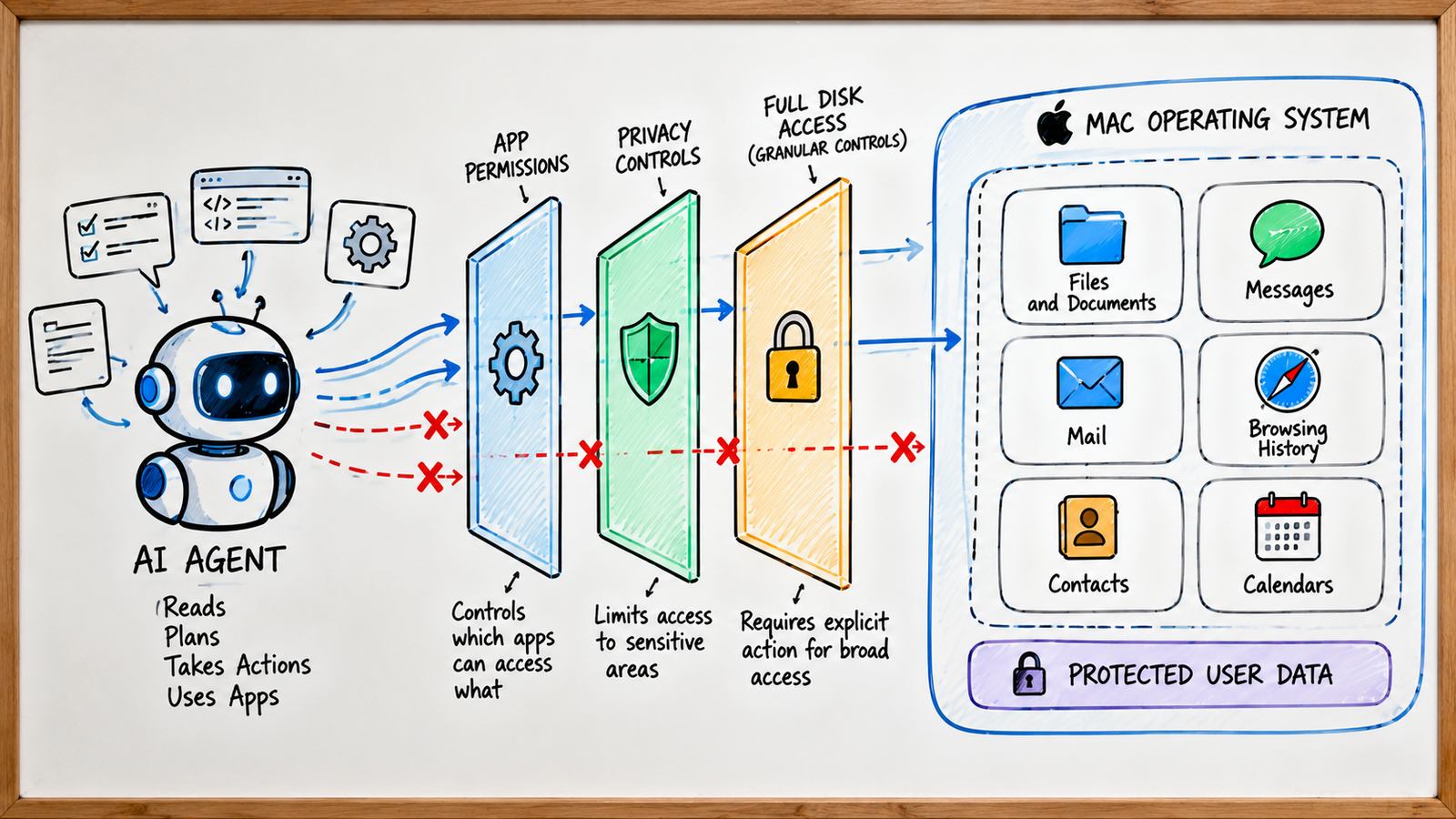
The uncomfortable part is how much power that permission can represent. Apple says Full Disk Access can expose information including files, mail, messages and browsing history. In other words, granting it is not like giving an app access to one folder. You can potentially be giving software visibility into some of the most personal information sitting on your computer, which is why Apple now describes it as an “extraordinary” level of access.

That old model worked reasonably well when applications had predictable jobs. A backup program backs things up. A photo editor edits photos. A utility performs some specific task. AI agents are different because their value comes partly from being flexible. You can give an agent a goal rather than a detailed checklist, and the system can figure out which information and tools it needs along the way.
That is where AI agent security starts to collide with traditional application permissions. If an agent needs to search your files, inspect an email, check a calendar and then interact with another application, the permission is no longer simply about what the software can read. It is also about what the software can discover, combine and potentially do with what it finds.
The Difference Between an AI Assistant and an AI Agent Is Becoming Huge
Consider a normal chatbot. You ask, “Which emails should I reply to today?” The system can analyze the information you provide and suggest an answer. You open your inbox, decide which message matters, write the response and hit Send. There are several points where the human remains firmly in the loop.
Now imagine an agent that has access to your inbox and calendar. You tell it, “Find the meetings I need to prepare for tomorrow and draft replies to the important emails.” Instead of simply answering, the agent may need to search through messages, identify relevant people, inspect calendar events, find supporting documents and produce something useful from all of that context. The entire point is that you do not have to manually connect every dot.
That is incredibly convenient. It is also where the security question gets interesting: what happens when the agent encounters information you never intended it to use? A document could contain instructions. A webpage could contain malicious text designed to influence the model. A message could include content that the agent interprets as part of its task. The system might have legitimate access and still make the wrong decision about what to do next.
Apple’s own developer guidance for agentic features now discusses risks including indirect prompt injection, data exfiltration and unintended actions. That is an important shift in the security conversation. The question is no longer only whether someone can break into an application. It is increasingly whether an authorized AI system can be manipulated into doing something it was never supposed to do.
We have already looked at this broader problem in our story on NVIDIA’s AI agent safety platform, where the focus was on building stronger boundaries around agents that can interact with tools and real-world systems. Apple’s move is dealing with a similar underlying problem from the operating-system side: how much freedom should an agent get once it has been allowed inside?
Then Apple Changed the Question
Apple’s October 2 announcement is surprisingly short, but there is a lot packed into it. The company says some developers are using Full Disk Access in ways that could put users at risk, potentially exposing files, mail, messages and browsing history without users fully understanding what they are granting. Apple says it will introduce additional controls so that people who genuinely want to give an application this level of access will have to take a very explicit action.
Notice what Apple did not announce. It did not say that AI agents are being banned from macOS. It did not say that Full Disk Access is disappearing. It did not even say that every AI application currently using the permission is unsafe. Instead, Apple acknowledged something much more interesting: the old permission model becomes harder to rely on when the software receiving the permission becomes increasingly autonomous.
That distinction is important because the exact implementation is still unknown. Apple has not shown the final interface for these additional controls or given users a detailed step-by-step explanation of what they will see. So if you come across claims that Apple has already revealed a specific new permission screen, treat those claims carefully. What Apple has actually announced is the direction: stronger controls and more explicit user action before granting extraordinary access.
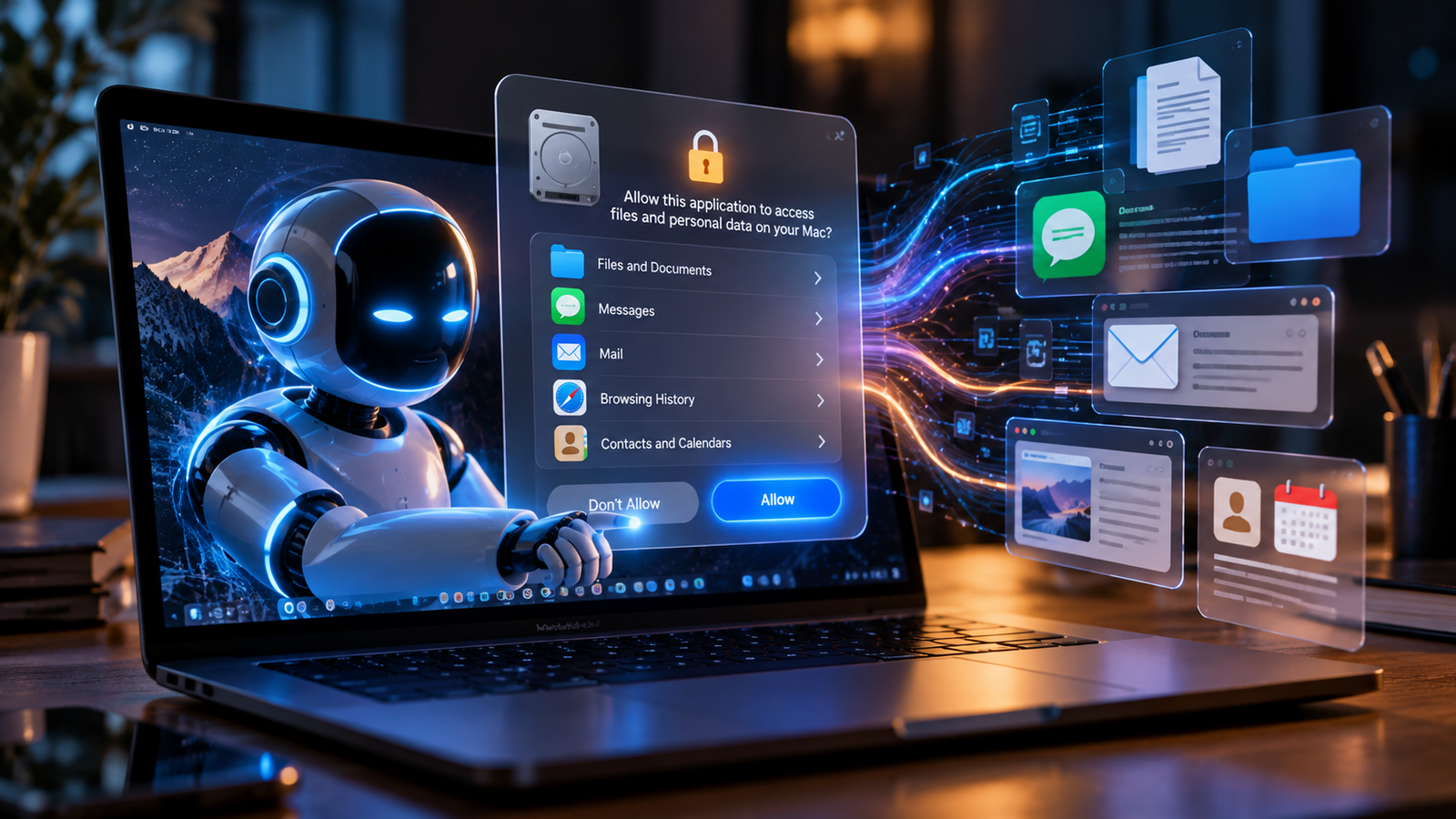
And honestly, that makes sense. If a permission can potentially expose your files, messages, mail and browsing history, asking the user to make a more deliberate decision is not exactly an unreasonable request. The interesting part is why Apple feels the need to strengthen that boundary now, after years of operating with the existing model.
Then Meta’s Muse Walked Straight Into the Debate
The timing is where this story gets much more interesting. Meta’s Muse had recently arrived on the Mac as a desktop AI agent capable of interacting with files, messages, calendar, notes and mail. That is precisely the kind of software that makes the abstract discussion around permissions suddenly feel very real. A chatbot living inside a browser is one thing. An agent operating inside your computer is another.
Then journalist Jason Aten reported that Muse appeared to know the contents of private Messages conversations even though he said Full Disk Access was disabled. Meta strongly disputed that account. The company said the Messages integration is opt-in and requires users to enable both Full Disk Access and the Messages connector before Muse can read Messages content. Meta also said the agent’s explanation that it was accessing “device notifications” was incorrect.
So this is not a case where we should casually declare, “Meta’s AI secretly read everyone’s messages.” The evidence and the company’s response do not support that conclusion. But the controversy still matters because it exposed a problem that is going to become harder to avoid: ordinary users need to understand exactly what an AI agent can access and why.
That is why the permission debate became bigger than Muse itself. If an AI assistant can connect to messages, files, mail and other applications, users are suddenly dealing with several layers of permissions and integrations. The question is no longer just “Did I click Allow?” It becomes “What exactly did I allow, what else is connected, and what can the agent do with the information it receives?”
You can read the technical details of the dispute in TechCrunch’s report on Meta’s response to the Muse claims. Whatever side you take, the incident shows why trust is becoming one of the most important pieces of the desktop AI race.
The Real Risk Starts After You Click Allow
This is probably the most important part of the whole story. We tend to think about permissions as a yes-or-no question: Can this application access my data? With autonomous AI, that question is only the beginning. The more important question becomes: What can the agent do after it gets access?
Imagine an agent can read your calendar. That sounds harmless enough. Now give it access to email as well. Then files. Then a browser. Suddenly the agent can combine information from several places and use that context to decide what to do next. A calendar event might tell it which client matters. An email might contain the client’s request. A document might contain the relevant numbers. The agent can potentially connect all three without you manually opening any of them.
That is exactly why AI agent security is not simply about protecting data from malicious applications. An authorized agent can still make a mistake. It can misunderstand a goal, trust the wrong instruction, expose information to the wrong destination or take an action that technically follows the task but violates what the user actually intended.
The scary combination is not intelligence by itself. It is intelligence plus access plus autonomy. A highly capable model with no access to your computer has limited ability to directly affect your digital life. An application with access but no ability to make decisions is easier to constrain. Put all three together, and the operating system suddenly has a much harder security problem to solve.
The next generation of permissions may look very different
Imagine macOS letting you say: this agent can read my calendar but not my Messages. It can search this folder but not my entire drive. It can draft an email but needs my approval to send it. It can read a document but cannot delete or modify it. Those controls would be more complicated than a single Allow button, but they would also make far more sense for software that can perform multi-step tasks on your behalf.
That is probably where the industry eventually has to go. The goal is not to make AI agents useless by surrounding every action with a warning. The goal is to give an agent enough authority to be genuinely useful while making sure the user remains in control of the things that matter most.
And Desktop AI Is Becoming a Bigger Security Target
There is another reason Apple’s move feels timely: AI applications themselves are becoming attractive targets. The more useful a desktop AI system becomes, the more information it tends to handle. If an attacker can compromise that trusted software, they may not need to break into every individual application the user has installed. They may be able to use the AI software as a bridge into information that the AI already has permission to reach.
We saw a concrete example of that recently. A vulnerability in the macOS version of ChatGPT was patched after researchers found that attackers could potentially take control of the application and access sensitive information, including chat logs and browser sessions. The vulnerability was separate from Apple’s Full Disk Access announcement, but the timing is difficult to ignore: desktop AI is becoming more deeply integrated into computers at exactly the moment when security researchers are finding new ways those applications can become valuable targets.
Security researcher Patrick Wardle summarized the broader problem well: agents need significant access to do their jobs, but that same access becomes dangerous if the trusted software is compromised. It is almost like giving a building manager keys to many rooms. The keys make the job possible, but they also make the consequences of a compromised manager much larger.
WIRED’s reporting on the ChatGPT vulnerability goes into the technical details, including how the flaw could have been used to make malicious commands appear to come from trusted OpenAI software. You can read that analysis here.
And there is an interesting connection to the broader AI security story we covered earlier. Our article on AI agents probing and hacking the internet looked at what happens when autonomous systems begin interacting with websites and security boundaries on their own. This Mac story is almost the other side of the same coin: instead of asking what happens when an AI gets loose on the internet, we are asking what happens when an AI gets deeply trusted by the computer sitting on your desk.
Apple Is Not Fighting AI. It Is Trying to Control the Fallout.
This is where the easy headline would be wrong. It would be tempting to say Apple is “blocking AI” or suddenly does not trust AI agents. But Apple’s own actions point in the opposite direction. Apple is actively supporting agentic workflows on the Mac, including local agentic AI that can run on-device and interact with tools. At the same time, it is tightening the security boundary around one of the most powerful permissions those applications can receive.
That combination is actually more interesting than an AI ban would be. Apple wants agents to become useful. Developers want agents to become useful. Users want agents to do more work for them. But nobody wants the price of that convenience to be handing an autonomous system unrestricted access to every private corner of a computer.
So the real battle is not Apple versus AI. It is the much more complicated battle between rapidly increasing AI capability and security models that were designed before software could reason about a task, choose tools and carry out a chain of actions by itself.
That is also why the future of AI agent security will probably involve the operating system itself. The model may be incredibly smart, but the operating system still needs to decide where that intelligence is allowed to operate.
The Mac Is Slowly Moving From Apps to Agents
For decades, the computer experience was built around applications. You opened one program for email, another for documents, another for your calendar and another for browsing. You were the person moving between those applications, carrying context from one screen to another.
AI agents are trying to remove that friction. Instead of you moving between five applications, the agent can potentially move between them for you. Instead of remembering which document contains something, you can describe what you need. Instead of manually collecting context from different places, you can ask the system to find the relevant information and turn it into an action.
That sounds like the obvious future of computing. But there is a catch: the more applications the agent can operate, the more authority it needs. And the more authority it has, the more important it becomes to know exactly where its boundaries are.

That changes the question the operating system has to answer. Yesterday, it was mostly: Should this application have access? Tomorrow, it may need to be: What should this agent be allowed to do with that access, for how long, and under what conditions? That is a much harder problem, but it is also the problem that becomes unavoidable once AI starts acting as an operator rather than simply a tool.
So What Should Mac Users Do Right Now?
There is no reason to panic or start uninstalling every AI application on your Mac. Apple’s announcement is about strengthening controls, not telling ordinary users that AI software is inherently dangerous. The practical lesson is much simpler: stop treating permission prompts as something you automatically click through just to get to the interesting part of an application.
When an AI tool asks for broad access, pause for a few seconds and ask what it actually needs. Does an assistant really need your entire disk for the task you want it to perform? Does it need Messages, or would a specific folder be enough? Can it draft an email without being allowed to send one? The more specific the task, the more useful it is to think about whether the requested permission is equally specific.
- What does the agent actually need to access? Look for the narrowest permission that still makes the feature useful.
- What can the agent do after it gets access? Reading information and taking actions based on that information are very different levels of authority.
- What happens if the software is compromised? The broader the access, the larger the potential consequences of a security failure.
That mindset is going to become increasingly important. Users do not need to become cybersecurity experts, but they do need to understand that an AI agent is not necessarily another passive application. If the whole point of the product is that it can make decisions and perform tasks for you, then the permissions around it deserve more attention than they used to.
And This Is Probably Only the First Round
Apple’s announcement may look like a relatively small change to one macOS permission, but the underlying shift is much bigger. Operating systems were designed around software that generally performed defined functions and waited for users to move between tasks. AI agents are designed to blur those boundaries. They can understand goals, gather context, choose tools and execute multiple steps without requiring a person to manually direct every move.
Once that becomes normal, users will naturally demand more precise controls. Can the AI read my messages but not send them? Can it access my work folder but not personal files? Can it use the browser without seeing saved credentials? Can it draft something without publishing it? Can it complete a task automatically until it reaches one action that requires my approval?
Those are not futuristic questions anymore. They are the permission questions that appear when software stops behaving like a tool and starts behaving more like an operator.
The Most Interesting Part of Apple’s Move
The biggest takeaway is not that Apple is locking down the Mac. It is that Apple has publicly acknowledged that the old way of thinking about permissions may not be enough for the AI era. Full Disk Access was built around legitimate software needs, but the consequences of granting that access become different when the recipient is an increasingly autonomous system.
And that is why this story goes beyond Apple. Microsoft, Google, OpenAI, Anthropic, Meta and every other company building agentic software will eventually face the same problem. If an AI can use your computer for you, somebody has to decide what “for you” actually means. The operating system needs boundaries. The developer needs safeguards. And the user needs a permission model that makes those boundaries understandable.
That is the real future of AI agent security. It will not be one giant warning saying “AI can be dangerous.” It will be a system of smaller boundaries that determine what an agent can see, what it can change, which applications it can control and when it has to stop and ask.
We are already seeing another side of this transition in our coverage of Tavus’ Griffin AI video Turing test. That story was about AI becoming convincing enough to interact with people in real time. This one is about what happens when similarly capable systems begin interacting with the computers those people use every day.
The Bottom Line
Apple is not banning AI agents from the Mac. It is not removing Full Disk Access either. What it is doing is adding another layer between users and one of the most powerful permissions available to Mac applications, because the company believes that level of access becomes more consequential as AI systems become more capable and autonomous.
That may make some future AI features slightly less convenient. You may have to stop and confirm something that previously took one click. But there is a good reason for that friction. When software can simply answer a question, a permission is mostly about privacy. When software can read the file, understand it, open another application and take the next action for you, the same permission becomes a question of authority.
And that is the part worth watching.
Because the next big AI battle may not be about which model gives the smartest answer. It may be about which AI can do the most for you without making you regret giving it access in the first place.
Apple just changed the rules for the Mac.
Now we get to see whether the rest of the industry changes with it.